How it fits together
Most tools in this space do one of two things. Some enforce: they stop an agent doing something dangerous. Others certify: they help you write down which controls you meet. AI Agent Lens connects the two:
The decision that stopped an agent is, with no extra step, evidence for a named control.
Nobody re-enters that evidence, so it records what actually happened, not what someone remembered to write down. This page shows how the connection works, how far it reaches today, and where it stops.
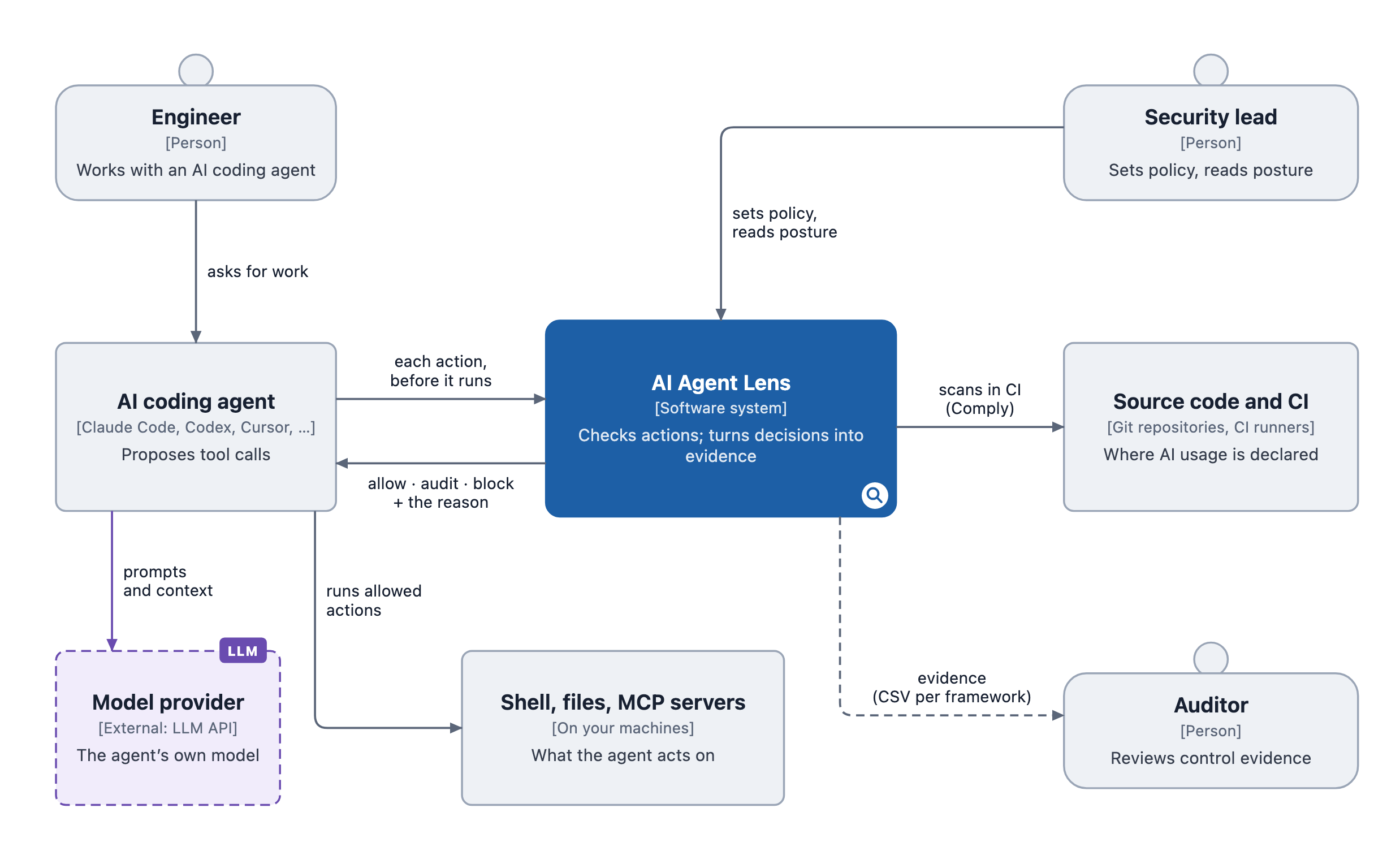
Open the interactive architecture to zoom into any part.
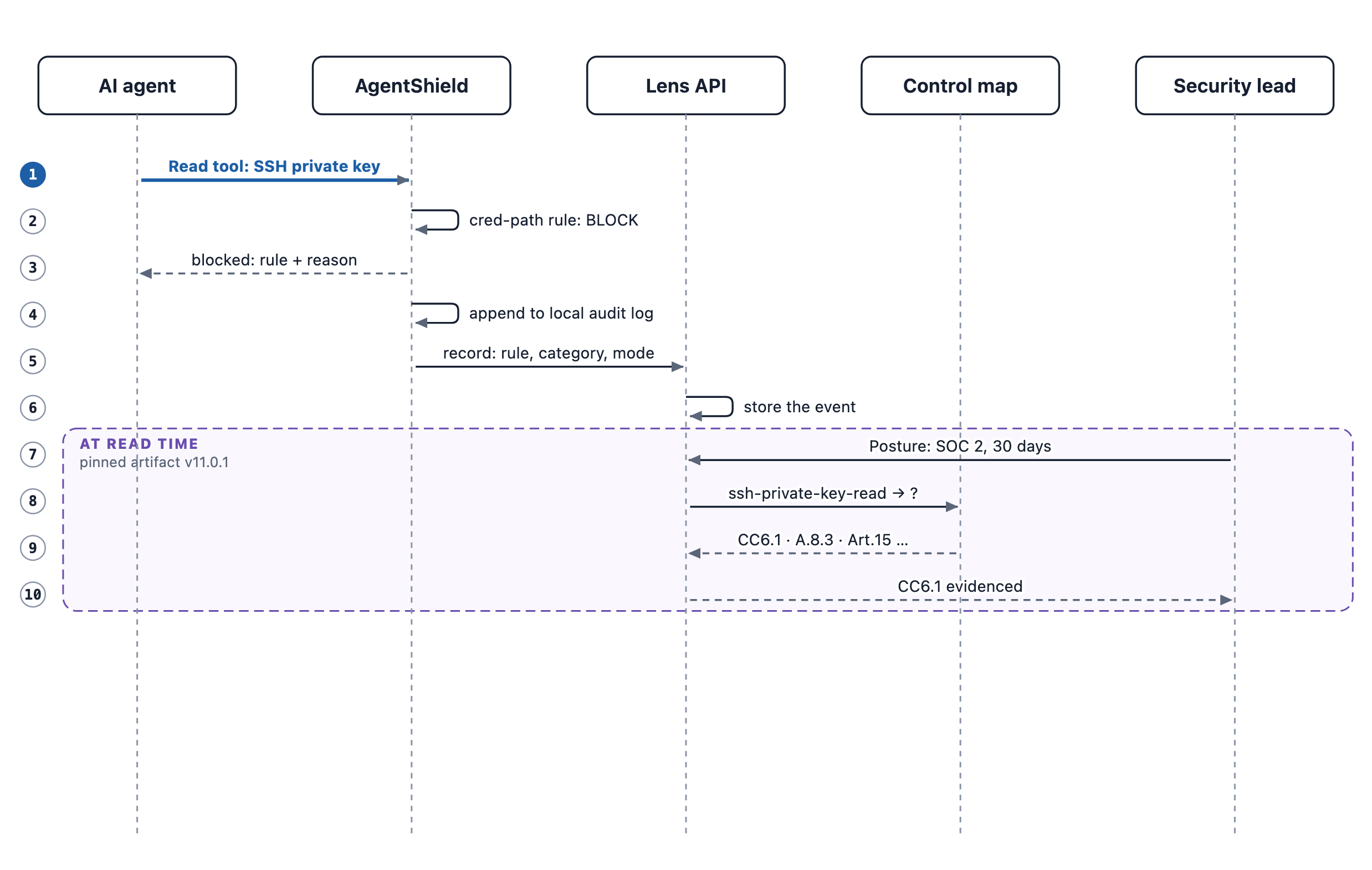
One blocked action, end to end
-
Enforce. Claude Code's Read tool asks for
~/.ssh/id_rsa. AgentShield's premium rulemcp-prem-block-cred-path-filepath-keyblocks it before it runs, and tells the agent why. -
Record. The decision is written to the machine's audit log. If the machine is signed in, the record is also sent to your organisation, carrying the rule's threat category:
credential-exposure/private-key-access/ssh-private-key-read. -
Map. When you open Posture, AI Agent Lens looks the category up in the control map, a versioned artifact (v11.0.1 today) that maps each threat category to the controls of each framework. This one maps to:
Framework Control SOC 2 CC6.1 ISO/IEC 27001:2022 A.8.3 ISO/IEC 42001:2023 A.6.2.8, A.9.4 EU AI Act Art. 15 MITRE ATLAS AML.T0055 OWASP LLM Top 10 LLM02 Every mapping in the control map carries a written rationale for why that category evidences that control.
-
Show. Posture lists CC6.1 as evidenced in the window. Click it to see only the events behind it. Export evidence (CSV) writes the framework's window to a file.
The same path works for every rule that carries a threat category. Comply findings take the same route from the other side: a static finding carries a threat category, and it lands on the same controls. See Comply.
The same read typed as a shell command, cat ~/.ssh/id_rsa, is stopped earlier by AgentShield's built-in protected-path check, which covers ~/.ssh, ~/.aws and similar directories. That check carries no threat category yet, so the block is recorded but not counted as evidence for any control. A rule that sees the same read, for example through $HOME/.ssh/id_rsa, is counted.
How far it reaches today
Every rule in AgentShield's rule packs carries a threat category, except 2 of 3,676. One is an ALLOW rule; the other is a documented catch-all backstop. The built-in protected-path check described above is not a pack rule and carries none yet. Whether a category maps to a control depends on the framework:
| Framework | AgentShield rules that map to at least one control |
|---|---|
| OWASP LLM Top 10 | 3,671 of 3,674 (99.9%) |
| ISO/IEC 27001:2022 | 3,660 (99.6%) |
| SOC 2 | 3,652 (99.4%) |
| EU AI Act | 3,635 (98.9%) |
| ISO/IEC 42001:2023 | 3,426 (93.2%) |
| MITRE ATLAS | 2,661 (72.4%) |
| OWASP Agentic Top 10 (2026) | 1,135 (30.9%) |
Measured on 2026-10-13 against control map v11.0.1, over community and premium rules.
Three things to read correctly in that table:
- It counts rules, not events. How much of your activity becomes evidence depends on which rules fire in your organisation. The Posture page shows that figure for your own data.
- "Maps to a control" is our claim, not an auditor's verdict. Each mapping has a written rationale, and we drop mappings we cannot defend. Your auditor decides what they accept.
- Low numbers can be correct. OWASP Agentic is about agent-specific risks. Mapping a plain credential read onto it would add noise, not evidence, so most rules deliberately do not map there.
GDPR and HIPAA are also shown on the Posture page, through a fixed table of rules rather than the control map, so they are not in the table above.
What counts, and what does not
- Counted: a decision whose rule's threat category maps to a control in the framework you are viewing. AUDIT decisions count as well as BLOCKs: an audited action is evidence that it was seen and recorded.
- Not counted, and shown as not counted: decisions where no rule fired, where the rule has no threat category, or where the category maps to no control in this framework. Posture breaks these out rather than hiding them.
- Validation runs count. Run validation on the Posture page evaluates 50 known attacks with the AgentShield engine and rules that AI Agent Lens runs on its own servers, not your machines' configuration. It records the results as validation events, and they are counted as evidence alongside real agent activity. That is how a new organisation shows evidence on day one. Tell your auditor which events came from validation runs.
- Static and runtime evidence meet on the same controls. They are shown side by side. The one place they are compared directly is MCP servers: the servers your repositories declare against the servers agents are seen calling.
What you can hand to an auditor today
| Export | Where | Contents |
|---|---|---|
| Evidence CSV | Posture → Export evidence | For one framework and window, the framework's rules with their decision, whether each is enabled, how often it fired and when it last fired. It opens with the audit log's chain verification result and head hash |
| Audit log CSV | Audit log | The filtered events |
| Compliance report | Compliance → Report | Markdown from the latest Comply scan, printable to PDF |
Tamper evidence: your organisation's audit log is hash-chained, and every evidence export states whether the chain verifies, along with its head hash. Keep that hash with the export: if anyone later rewrites the whole chain, the head will no longer match.
Not available yet: a signed, self-contained evidence bundle. Treat today's exports as working evidence that your auditor samples and verifies, not as a sealed record.
Next
- Standards, risks and languages: every standard and threat area in the control map.
- Architecture: what runs where and what leaves the machine.
- Posture and Compliance frameworks: the pages where this shows up.