Architecture
This page answers the questions a security review asks first. It covers what runs where, what leaves the machine, how a decision is made, what happens when something fails, and what AgentShield does not do.
Every figure here is one level of a zoomable C4 model. Open the interactive architecture: click any element marked ⊕ to zoom in, and click a numbered arrow to see exactly what crosses it.
What runs where
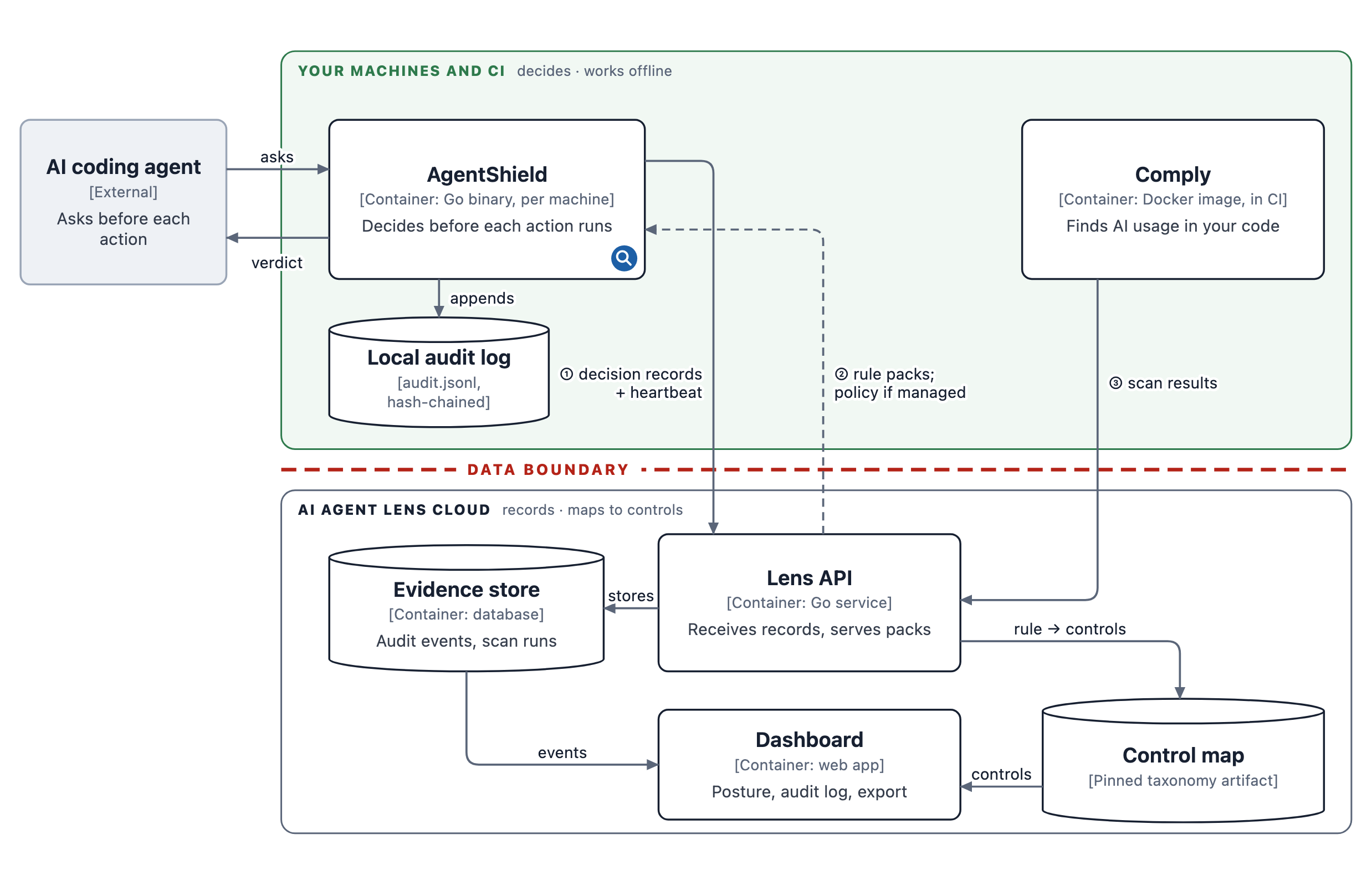
- AgentShield is one binary on each machine where an agent runs. It decides, and it keeps a local audit log.
- Comply runs in your CI, or locally, and scans repositories. See Comply.
- The AI Agent Lens cloud keeps your organisation's record and maps it to compliance controls. AgentShield does not need it to make decisions.
What leaves the machine
A machine that has never run agentshield login sends nothing. There is no telemetry, no update check and no model call. The only network access is a download you start yourself.
After agentshield login:
| What | When | Contents | |
|---|---|---|---|
| ① up | Decision record | Every decision, including ALLOW, while the agent waits (3-second timeout) | Command text, or tool name and tool arguments for MCP calls (recognised secrets redacted), plus decision, rule ids, reason, threat category, mode, working directory, OS user name and session id |
| ① up | Heartbeat | Every 15 minutes, and when an agent is active | Host name, machine id, OS and architecture, CPU and memory, AgentShield version, mode, rule and command counts, which hooks are installed |
| ② down | Premium rule packs | Only when someone runs agentshield update | YAML rules |
| ② down | Policy and enforcement mode | Managed machines only | Your organisation's policy |
| ③ up | Comply scan results | When a scan runs with an upload token | Findings for that repository; see what a scan uploads |
Decisions made by the MCP proxy, self-protection text-rule blocks, and failures that happen before AgentShield can read its own configuration are not sent.
Before AgentShield writes the local log or sends the decision record, it redacts the secrets it recognises: in the command text and its arguments, in MCP tool arguments, and in reasons and error text. AI Agent Lens redacts again when it stores the record, and before any record goes to a model provider. Redaction recognises secret shapes, such as API keys, bearer tokens, URL credentials and secret-named assignments. A secret in a shape it does not recognise, such as a password inside a JSON body, can still get through, so pass secrets through environment variables or a secrets manager rather than in command text.
How a decision is made
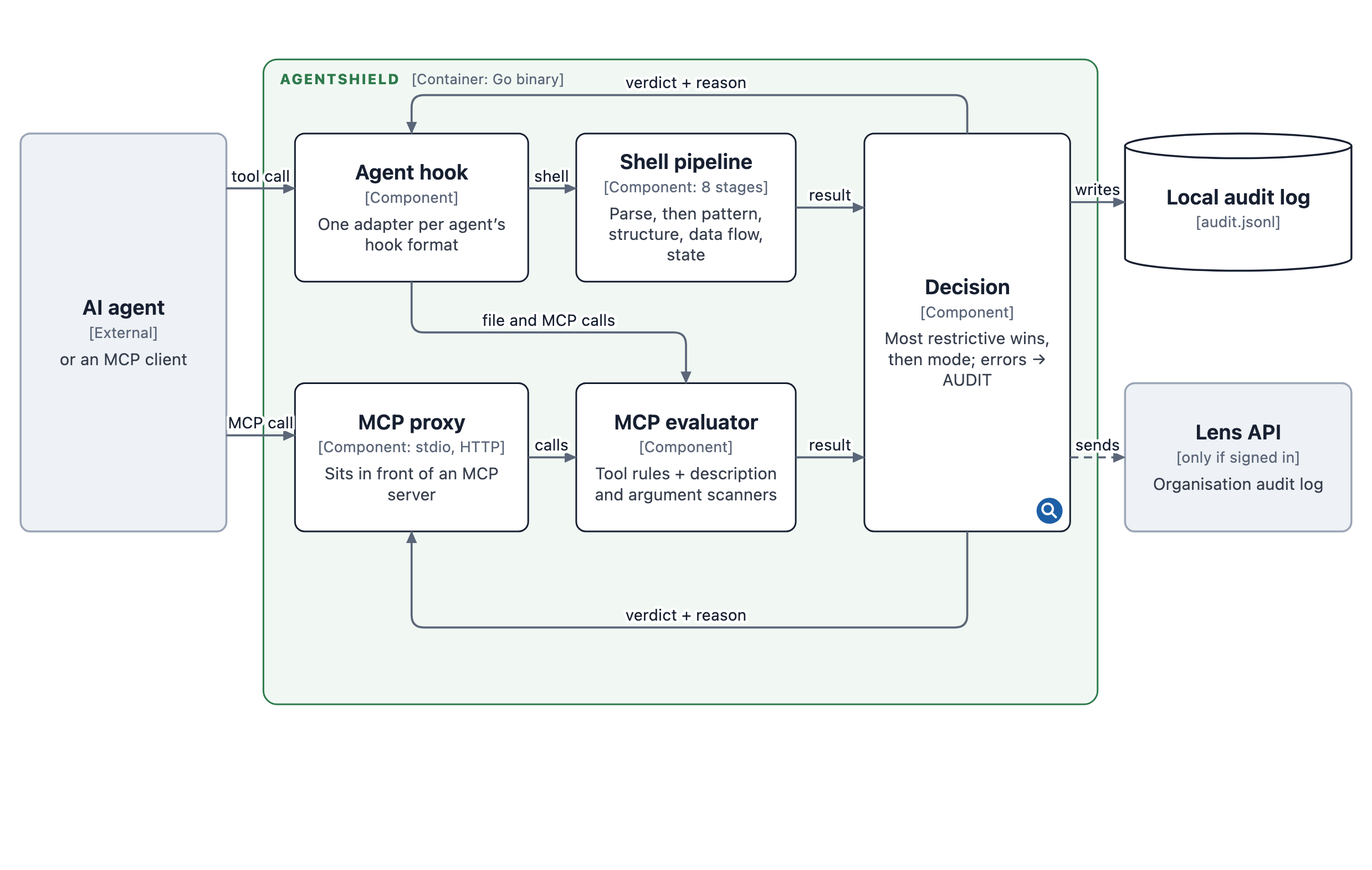
There are two ways in:
- The agent hook. The agent asks before each tool call.
- The MCP proxy. It sits in front of an MCP server.
Shell commands go through an eight-stage pipeline, every stage deterministic and driven by YAML rules:
- intent labelling;
- regular expressions;
- structural parsing of pipes, redirects and flags;
- substitution of variables and constant decoders;
- semantic classification;
- data flow from source to sink;
- multi-step state, such as download-then-execute;
- guardian heuristics.
Two more stages run only when you configure them: skill-script integrity and customer-defined data labels. MCP calls go through MCP rules plus scanners for poisoned tool descriptions and sensitive arguments.
The decision step combines everything that fired, and the most restrictive result wins: BLOCK over AUDIT over ALLOW. A command that matches no rule is AUDIT. A command that touches a protected path, such as ~/.ssh or ~/.aws, is BLOCK. The mode then decides what the agent experiences:
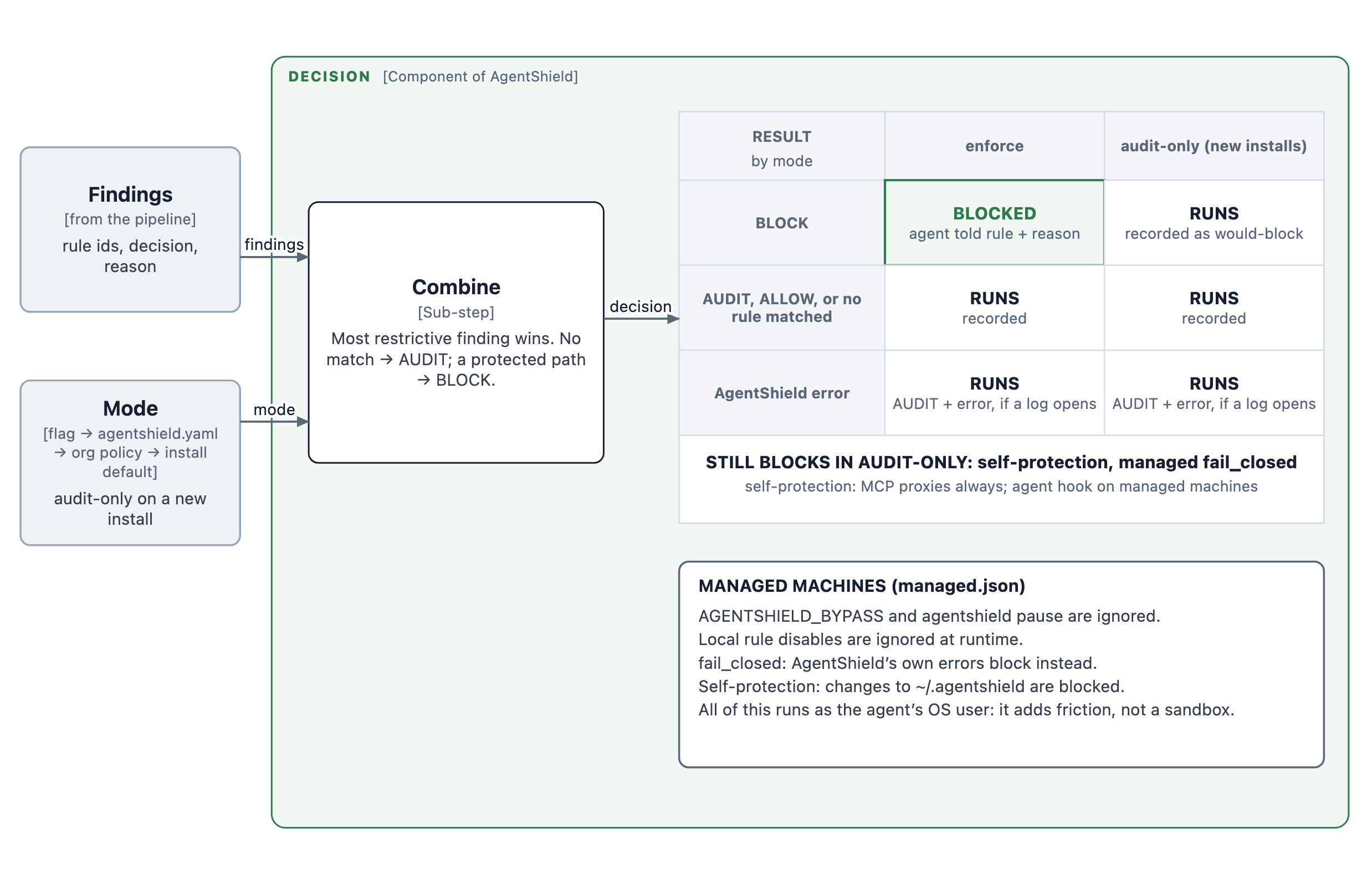
New installs start in audit-only, and one line in agentshield.yaml turns enforcement on. The agent hook honours the mode, and the MCP proxies honour it for tool calls. Self-protection still blocks in audit-only on the MCP proxies on every machine, and in part on the agent hook, which has a known gap. See Decide how strict to start for exactly what still blocks.
When something fails
| Failure | Default | Managed machine with fail_closed |
|---|---|---|
| A policy file cannot be loaded | Action runs, recorded as AUDIT (agentshield-eval-error) | Blocked |
| AgentShield's configuration or audit log cannot be opened, or the agent's input cannot be parsed | Action runs. Nothing can be written locally: the event is sent to AI Agent Lens if the machine is signed in; otherwise only a warning reaches stderr | Blocked |
| A rule pack fails to parse | That pack is skipped, with a CRITICAL line on stderr; the rest still apply | Blocked |
| The hook does not answer in time | Decided by the agent, not AgentShield; Copilot CLI, for example, treats a timeout as allow | Same |
The default is deliberate. A security gate that blocks developers when it misconfigures itself gets uninstalled, so a failure lets the action run rather than silently enforcing. Choose fail_closed where the opposite trade-off is right.
Managed mode
Managed mode is for machines where the person at the keyboard, or an agent acting for them, should not be able to switch AgentShield off. It is set by a managed.json your device management deploys:
AGENTSHIELD_BYPASS=1andagentshield pauseare ignored, and local rule disables are ignored at runtime.- Self-protection rules block writes to AgentShield's own directory,
~/.agentshield, from shell commands and, on Claude Code and Copilot CLI, from the agent's file-writing tools. From the shell they also block deleting hook files andagentshield setup … --disable. They do not stop an agent editing its own hook settings file, such as~/.claude/settings.json; pin that file with your device management. - Blocks from the self-protection text rules (deleting hook files,
setup … --disable) are not yet written to the audit log or sent to AI Agent Lens. Blocks from the protected-path layer on~/.agentshieldare recorded. - With
fail_closed, the failures above block.
The honest scope. AgentShield runs as the same operating-system user as the agent. Managed mode adds friction, but it is not a sandbox. For a hard guarantee, put OS-enforced ownership underneath it: a root-owned configuration directory, hook settings pinned by MDM, or a platform sandbox. AgentShield then records what the agent attempted inside that sandbox.
The audit trail
- On the machine:
~/.agentshield/audit.jsonl. Each line is written after redaction and linked to the previous one by a SHA-256 hash, andagentshield scanverifies the chain. That detects an edit made outside AgentShield; it does not stop the machine's own user from deleting the file. Failures that leave no audit log to write to (the second row of the failure table) and self-protection text-rule blocks do not produce a local line. - In AI Agent Lens: each record is redacted again and linked into your organisation's SHA-256 hash chain as it is stored.
GET /api/audit/verifychecks the chain, and the evidence export starts with the result and the chain head.- Records stored before the chain existed are counted and pinned, so adding to, altering or deleting them is detected too.
- A deployment rollback appears as a gap, sealed by a named operator with a reason, never silently.
- The chain does not stop someone with write access to the database who rewrites every hash and the head. Keep the head hash from each export to detect that.
Performance
| What | Measured |
|---|---|
| Rule evaluation alone, typical command (p95) | 1.4 ms (CI performance gate: 3 ms) |
| Rule evaluation alone, adversarial command (p95) | 27 ms (CI gate: 55 ms) |
| Whole hook process, shell command, built-in rules (median) | about 60 ms |
| Whole hook process, with premium packs on disk or an MCP call (median) | about 140 ms |
| When signed in | plus the time to send the decision record, up to a 3-second timeout |
The first two rows come from the CI performance test with the built-in community rules. The process timings were measured on an Apple-silicon MacBook Air (n = 30, 2026-10-13); they include starting the process and loading the rules. Expect different numbers on your hardware.
What AgentShield does not do
- It does not see prompts or model output, except in the gateway pilot. It sees the actions an agent proposes, and the tool descriptions an MCP server sends through the proxy. The exception is the enterprise gateway pilot, which sits on the model path and sees requests and responses. Prompt injection is caught when it turns into an action or arrives in a tool description, not in the conversation.
- It covers what each agent's hook exposes. For Codex, Gemini CLI, Cursor and Windsurf that is shell commands. See the coverage table.
- The MCP description scanner can hide legitimate tools. A tool whose description reads like an instruction to the model is removed from the list the agent sees. Wording such as "credentials" or "Execute a query" in an ordinary description can trigger it. If a tool is missing, look in the audit log for source
mcp-proxy-description-scan. - It is not a sandbox. An allowed command runs with the user's own permissions.
- It does not execute anything itself. It answers; the agent runs the command. The one exception is that
mcp-proxystarts the MCP server you configured, exactly as your agent would.